MainType

MainType

Quick Start Tutorial

MainType Tutorials

Quick Start Tutorial

written by Erwin Denissen, published July 3, 2019, updated July 14, 2020

Introduction

MainType uses a database and a vault to store font information, which allows for fast access to your fonts. The font manager comes with a utility (FmsConfig) to make and restore backups.
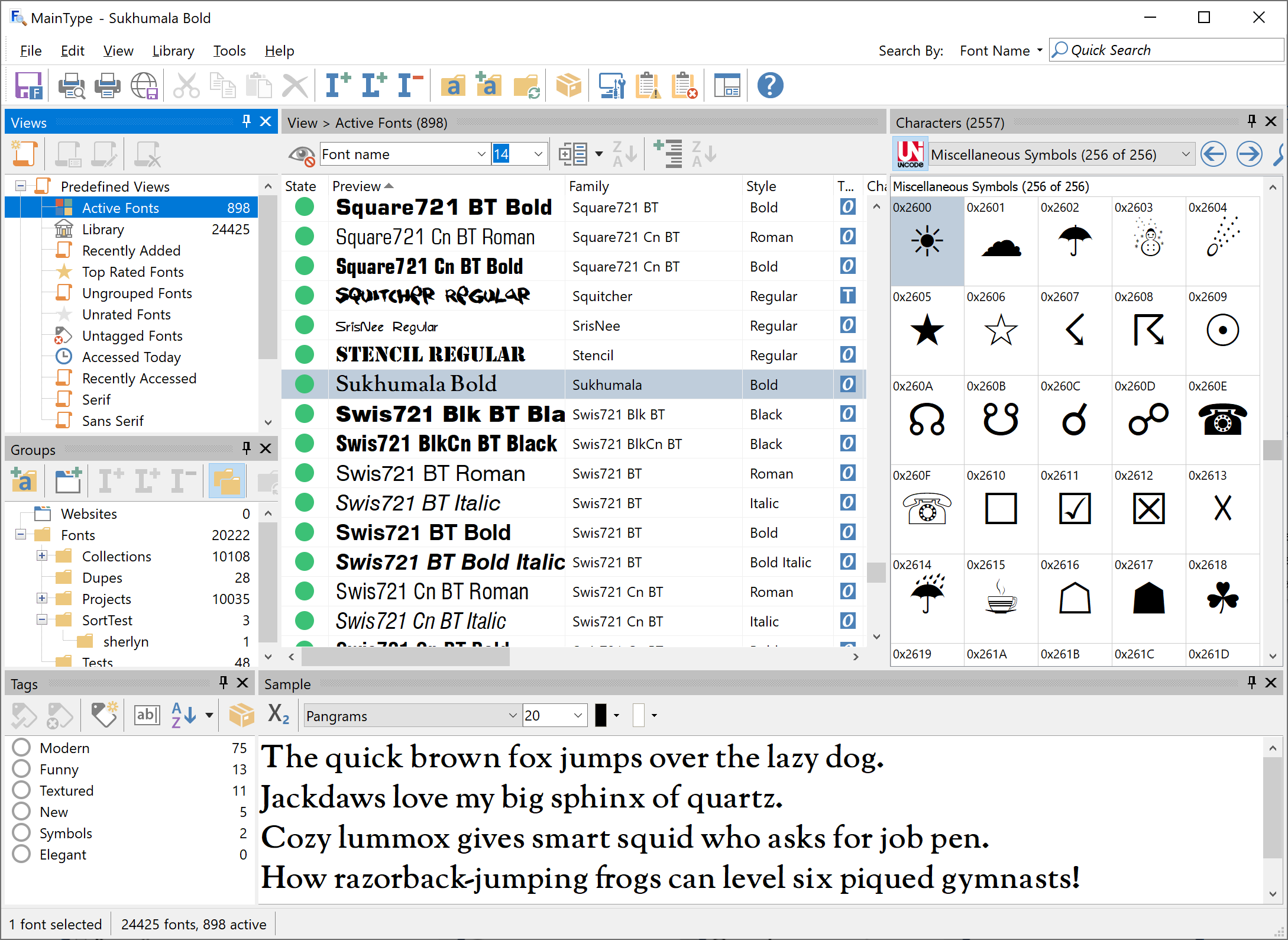
The user interface contains several panels, that you can move, reposition, resize, and even hide to your liking. When you have all panels in place for a specific task, do save the layout so that you can easily switch between specific layouts as needed.

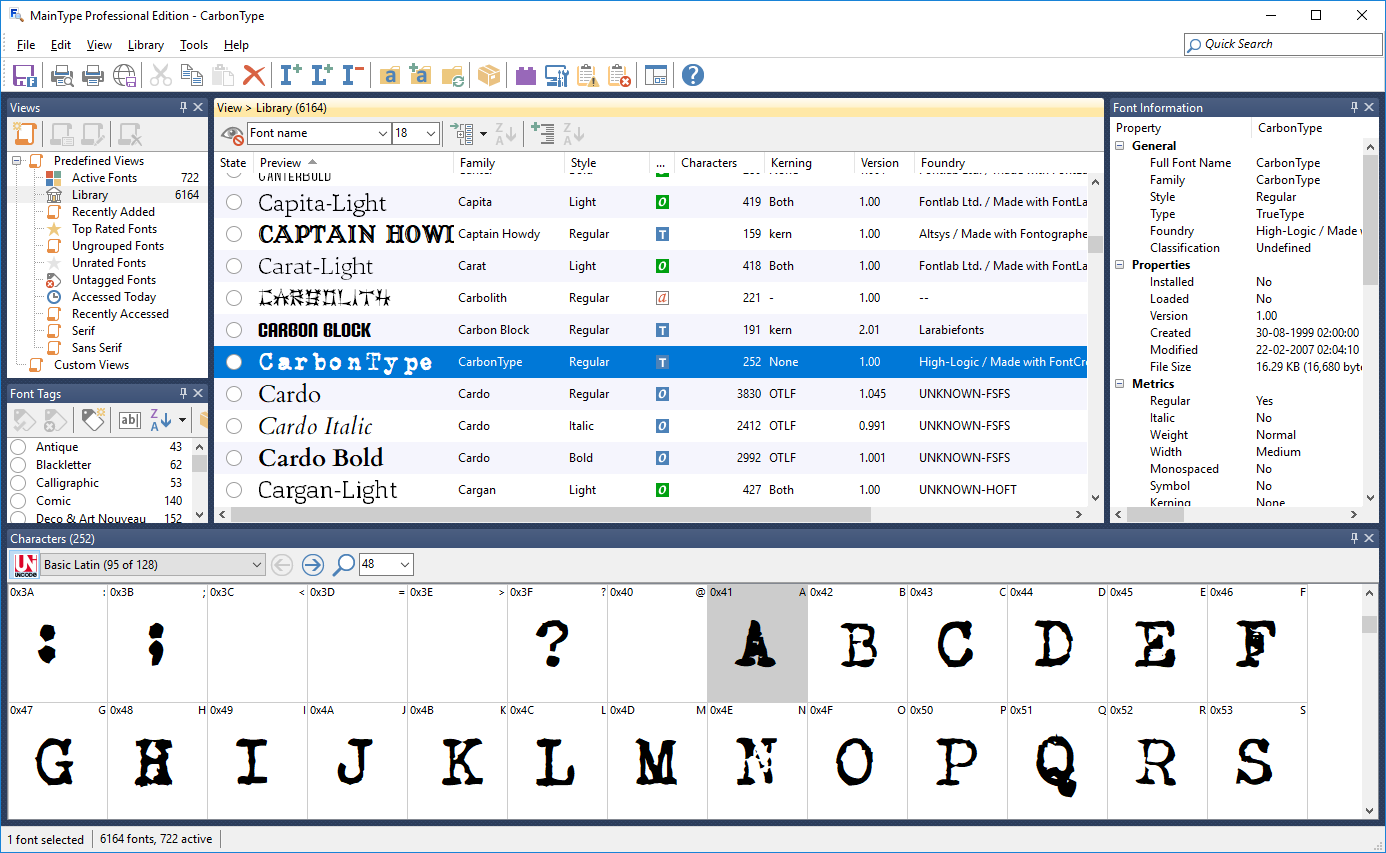
The font list shows the fonts based on the selected view or group. When the Active Fonts view is selected, it will show all active fonts. Active fonts are either installed or loaded, thus available to all applications. The toolbar contains a Preview Text combo box through which you can change the text shown in the “Preview” column.

By default, MainType displays thirteen columns in the fonts panel. If you right-click on any column header you can change the visibility of the columns and restore them to their original size. If the name of a column is checked, it will appear in the panel.

Add Fonts to MainType

MainType will automatically detect all installed fonts, but you need to tell where to look for more fonts on your system. To add fonts to your MainType font library, select Library from the main menu, and then click Add Font Folder. Click the Browse button to select a folder that contains (part of) your font collection.
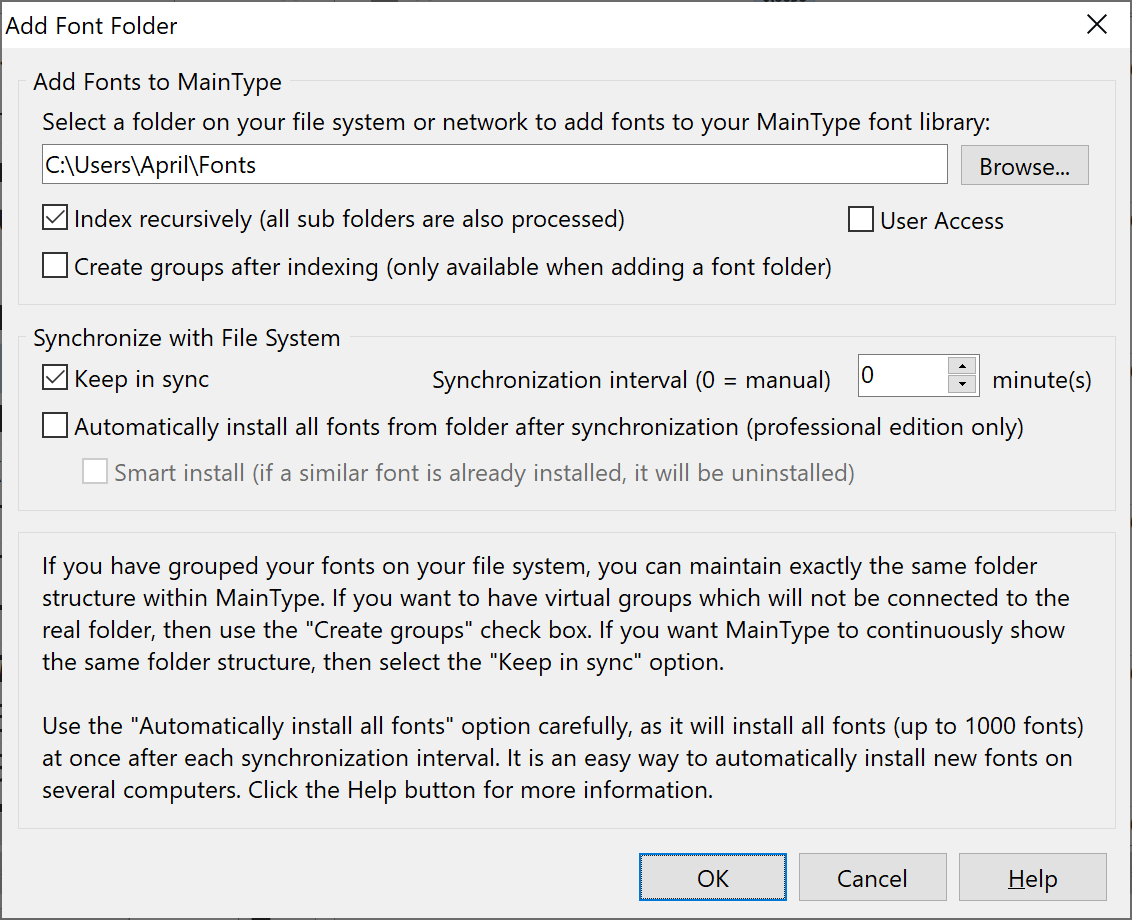
If you want to maintain groups within MainType, we recommend to create groups. If you prefer the way your fonts are organized on your file system, then it is best to use “Keep in sync” folders.

OpenType Layout Features

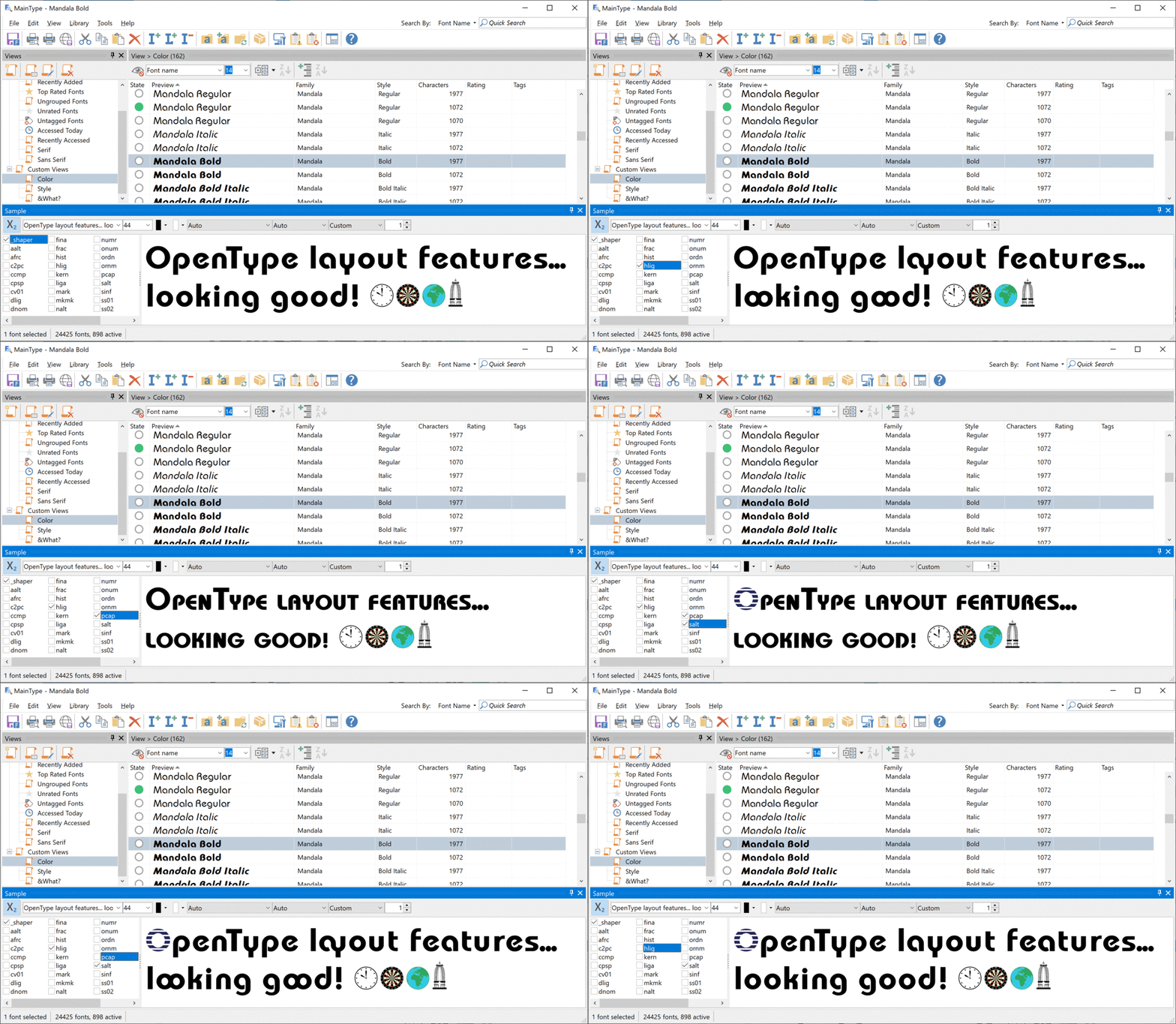
Use the Sample panel to select which features you want to apply to the preview text, so that you can test a font’s OpenType layout features directly in MainType. To enable this mode, click the X2 button. As a bonus it also supports color fonts!
Font Tags

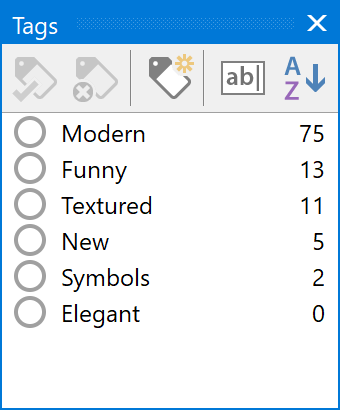
If you provide your fonts with meaningful tags, you'll be able to quickly find the perfect font for your next project. The Font Tags panel allows you to add one or more tags to the current selected font(s).

To add a tag to a font, right-click the font and select one of the available tags shown in the Tags submenu. Alternatively, if the Tags panel is visible, click on the ball to the left of the specific Tag. If it is not visible, go to the View menu and select the Tags panel from the Panels submenu.

There are more advanced ways to add tags, and that is covered in the user manual.
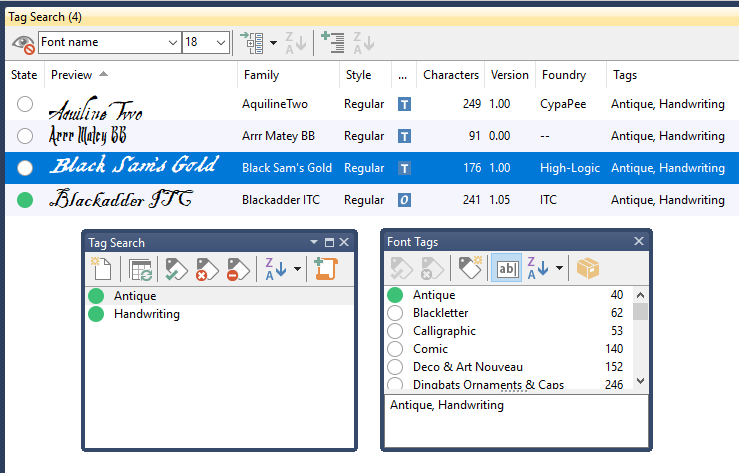
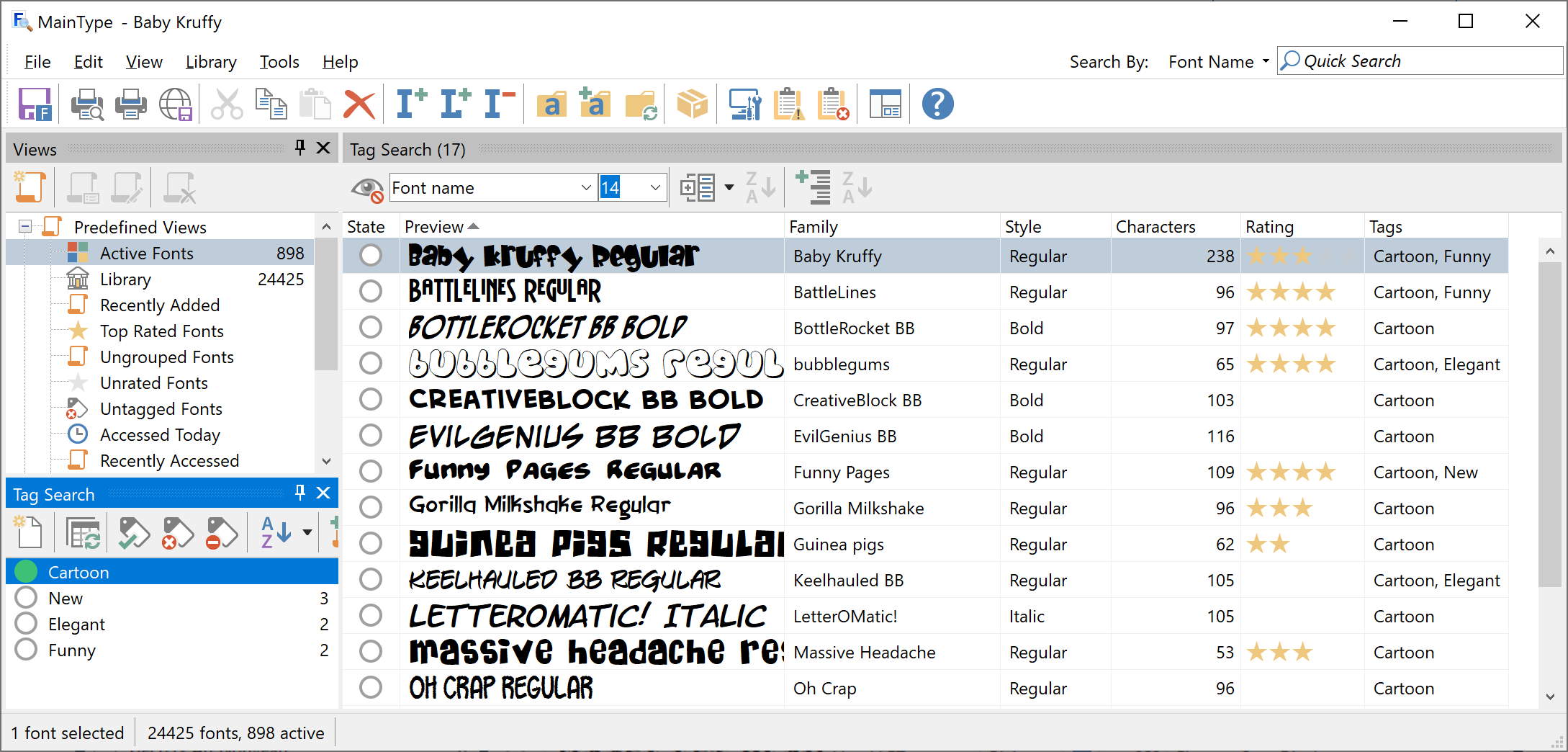
Use the Tag Search panel to find fonts based on one or more tags. To begin a search, simply click on one of the balls in front of the tags.
Character Grid Panel

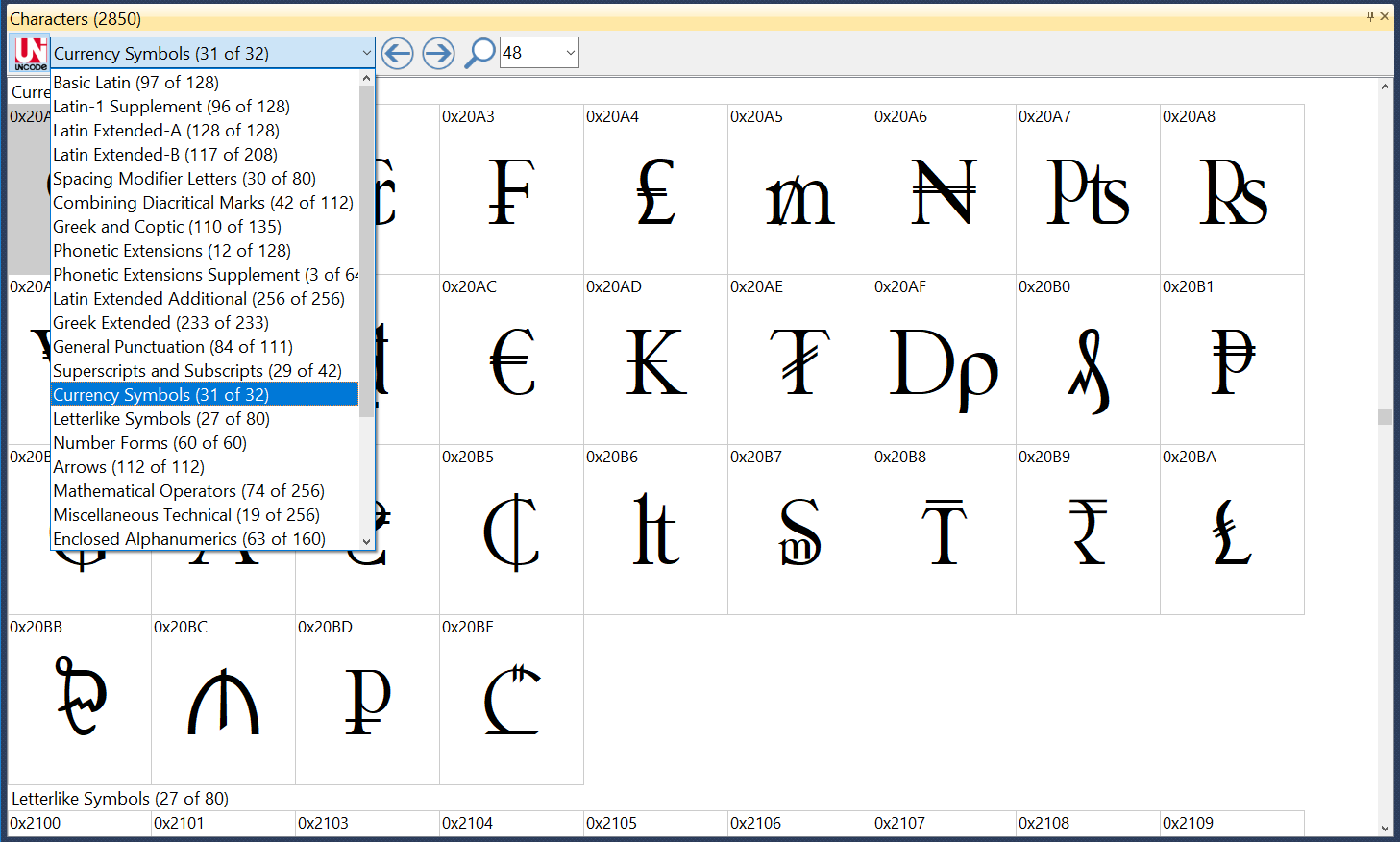
The character grid shows all characters available in the selected font. For your convenience, the characters are grouped into Unicode blocks. This panel also allows you to view all glyphs. To enable this, click the "Unicode" button on the toolbar.
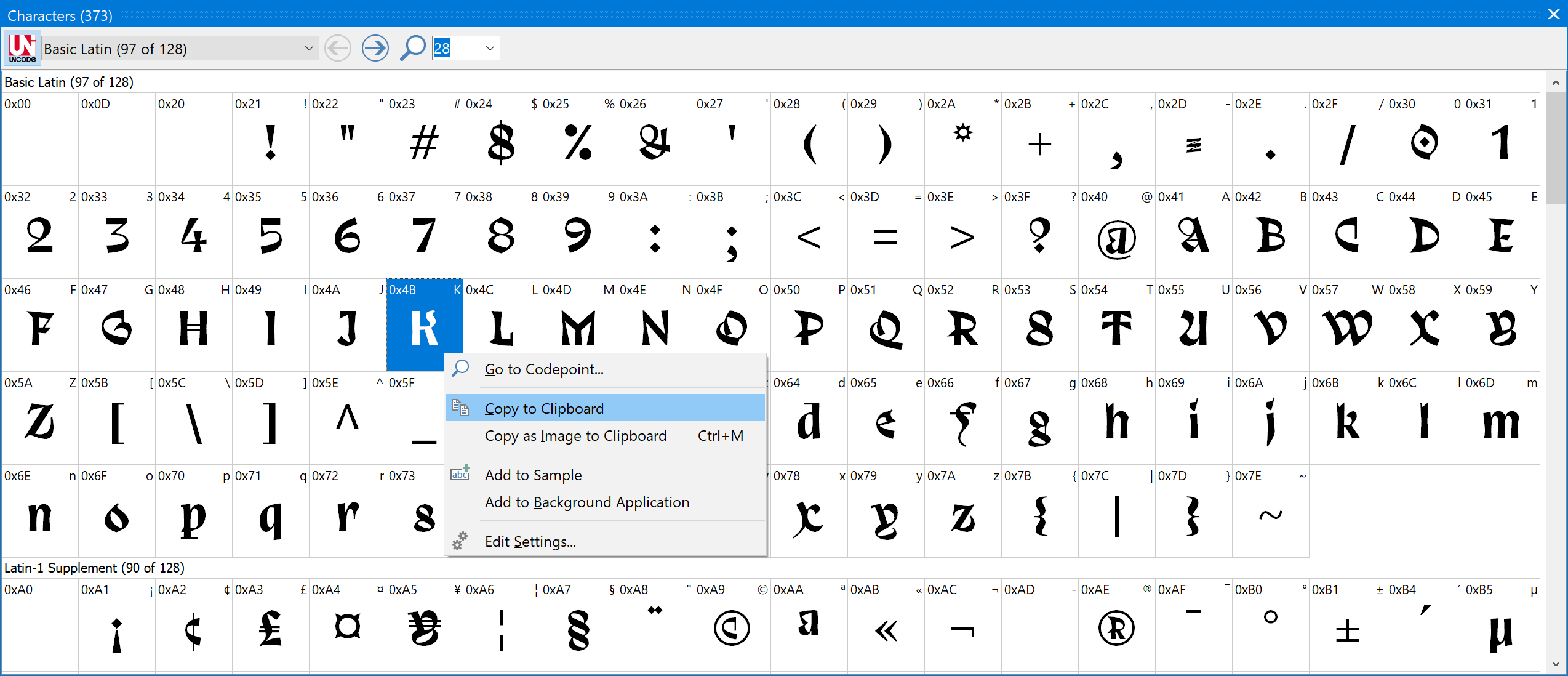
Right-click a character, to copy it to the clipboard, so you can paste it in other software, like a Word document, Cricut, InDesign, etc.

Feedback

Your feedback, suggestions for improvements, and questions related to this and other tutorials are welcome; please post them to the High-Logic Font Forum.
Shared Font Libraries for Teams

MainType Tutorials

Shared Font Libraries for Teams

written by Erwin Denissen, published January 16, 2026

Introduction

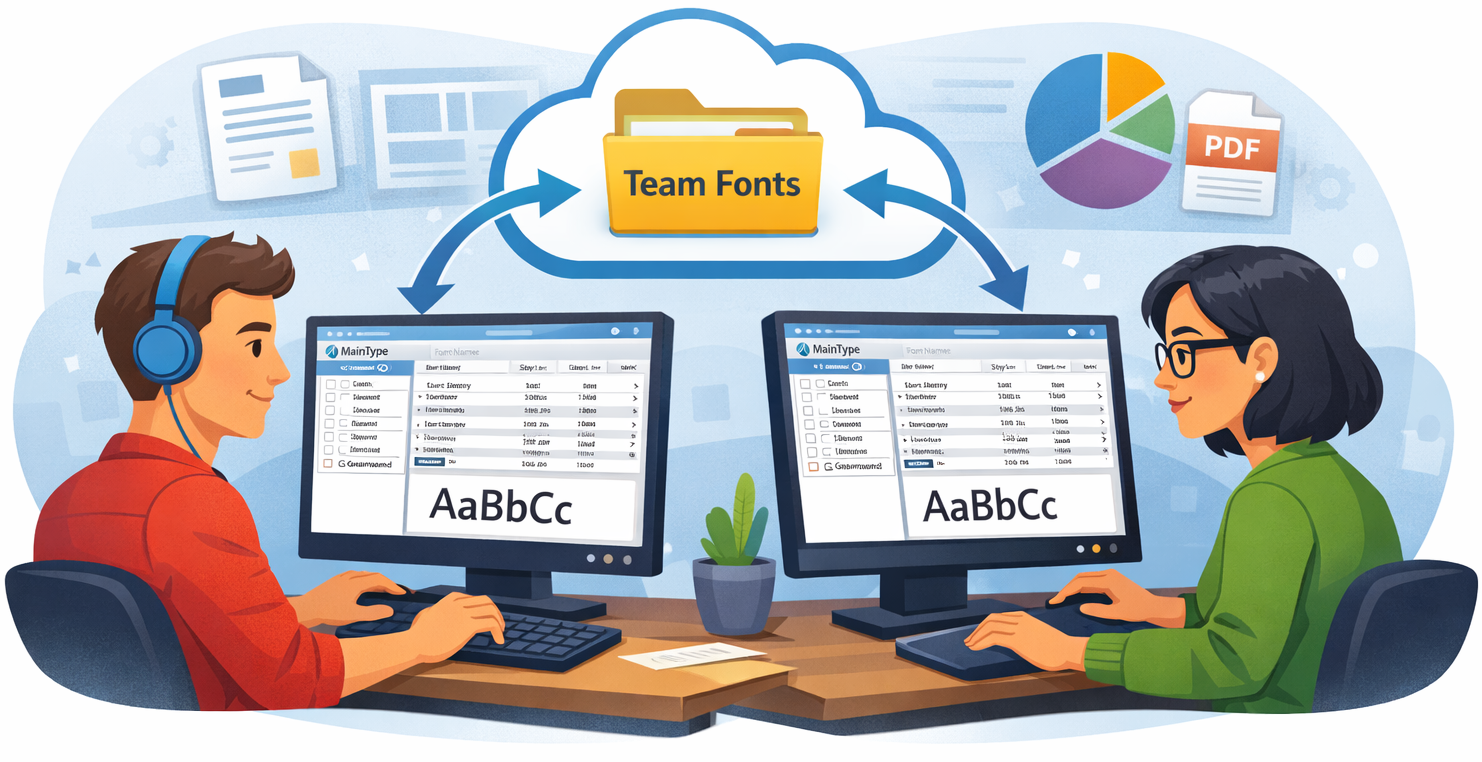
When multiple users work on the same documents, layouts, or production files, font consistency is critical. Missing fonts or different versions of the “same” font can cause substitutions, reflow, and unexpected output. With MainType, you can create a shared team font library and use font synchronization so every workstation stays aligned.

Why a shared team font library matters

A shared font library helps your team:

  • Open projects on any computer with the same fonts available
  • Avoid layout changes caused by version mismatches
  • Reduce production mistakes and rework
  • Standardize your workflow across multiple users and workstations

How font synchronization works in MainType

MainType is a font manager that can keep multiple computers consistent by using a shared folder as the “source of truth.” Instead of syncing directly between PCs, the team syncs to the same shared location, such as a shared network folder, Dropbox, Google Drive or any other file-sharing solution.

Each workstation adds the same shared folder to MainType and enables Keep in sync, so the font library stays updated automatically.

Set up a shared font library across computers

Create one central folder that contains your approved team fonts. This can be on:

  • a shared network drive
  • Dropbox
  • Google Drive for Desktop
  • another file-sharing utility

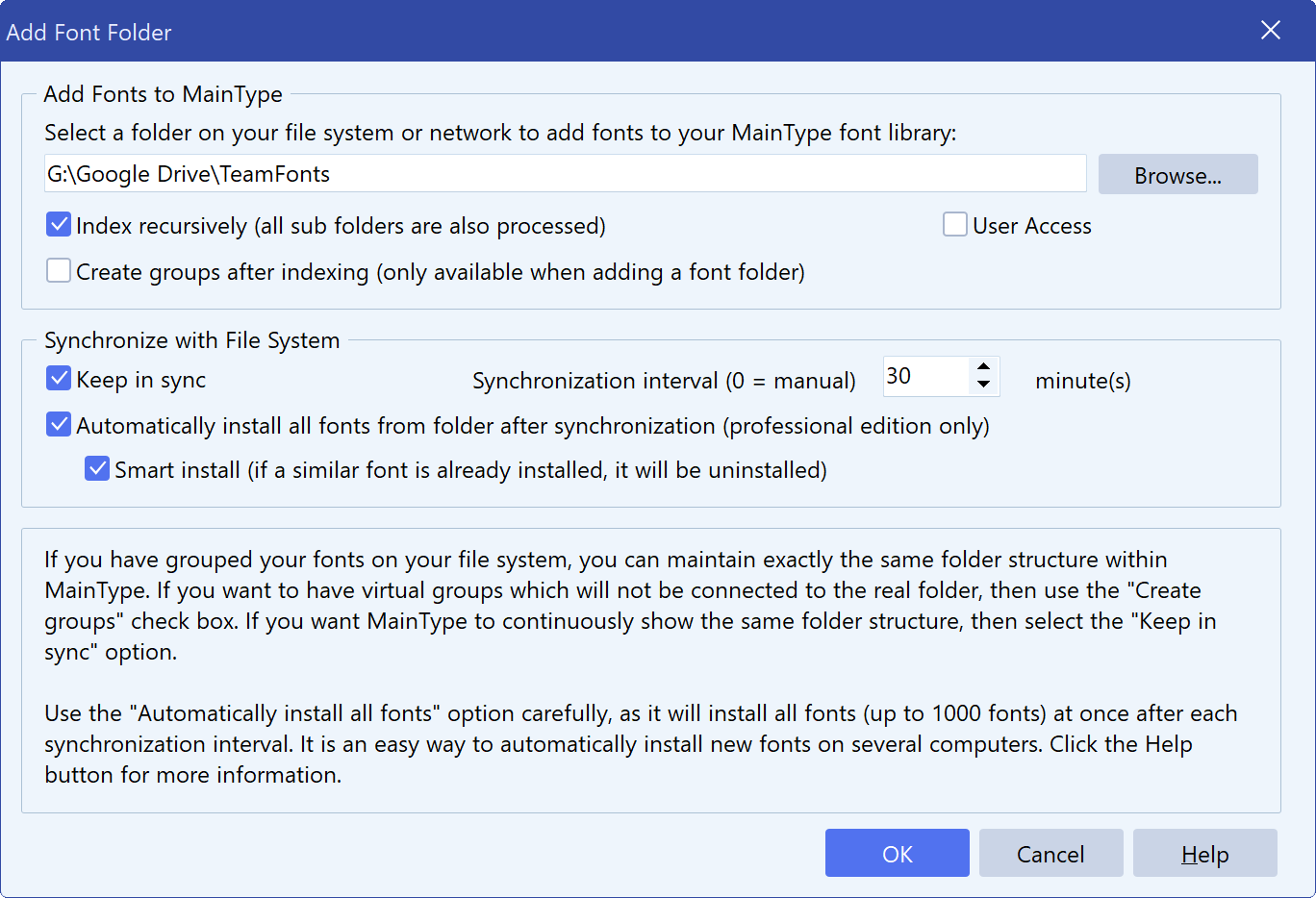
On each computer, open Library → Font Folders from the main menu and click Add.

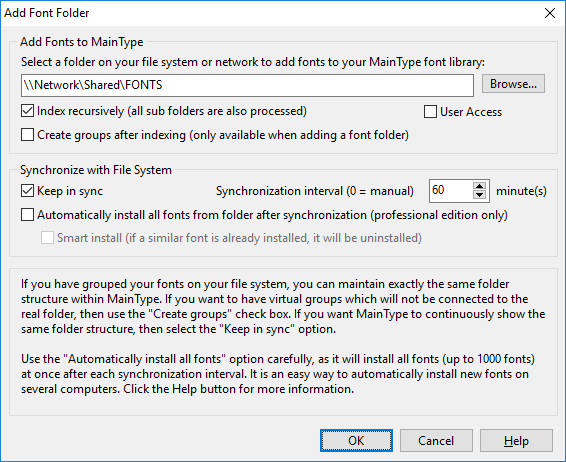
In the Add Font Folder dialog, click Browse and select the shared folder. Then set the following options:

  • Index recursively – Scan the folder and all subfolders.
  • Keep in sync – Keep MainType’s groups aligned with the folder structure on disk.
  • Synchronization Interval – Set how often MainType refreshes the folder (0 = manual only).
  • Automatically install all fonts… – Ensure the same fonts are installed in Windows on every workstation.
  • Smart install – Replace similar installed fonts to prevent “same name, different version” issues.

Updating fonts for the whole team

To roll out a change, add or replace font files in the shared folder. On the next refresh (automatic or manual), MainType updates the library and installs new and updated fonts across the team.

MainType does not automatically uninstall removed fonts

Team synchronization is designed to keep the shared set available and current, but it does not automatically uninstall fonts when they disappear from the shared folder. This avoids breaking personal or legacy projects that may still rely on those fonts and prevents unexpected disruption.

Identifying fonts installed by synchronization

When MainType installs fonts through this mechanism, it adds a tag named AutoInstall, making it easy to filter and review the fonts that came from your team synchronization setup.

Tip: Use the AutoInstall tag as your “team set” view inside MainType.

How to Find and Remove Duplicate Fonts

MainType Tutorials

How to Find and Remove Duplicate Fonts in Windows

written by Erwin Denissen, published January 19, 2026

Introduction

Over the years, your font collection can quietly grow into a mix of multiple versions of the same typeface, coming from downloads from different sources, older backups, updated releases, Windows updates, and shared project folders. While Windows won’t typically install true duplicates side-by-side, those extra files can still live in your font library and folders. MainType helps you spot outdated versions and clean up your library so you keep only the best font files.

Step 1 — Choose what you want to scan

MainType can detect duplicates within the exact part of your library you’re working on:

  • Scan the entire library
    In the Views panel, click Library to scan your complete font collection.
  • Scan another view (from the Views panel)
    In the Views panel, click any view you want to check (for example Active, Recent, or a custom view). MainType will scan only the fonts shown in that view.
  • Scan a specific group (from the Groups panel)
    In the Groups panel, click the group you want to check (for example a project group or category). Only fonts in that group are scanned which can be perfect for a focused cleanup.

Step 2 — Select duplicates automatically

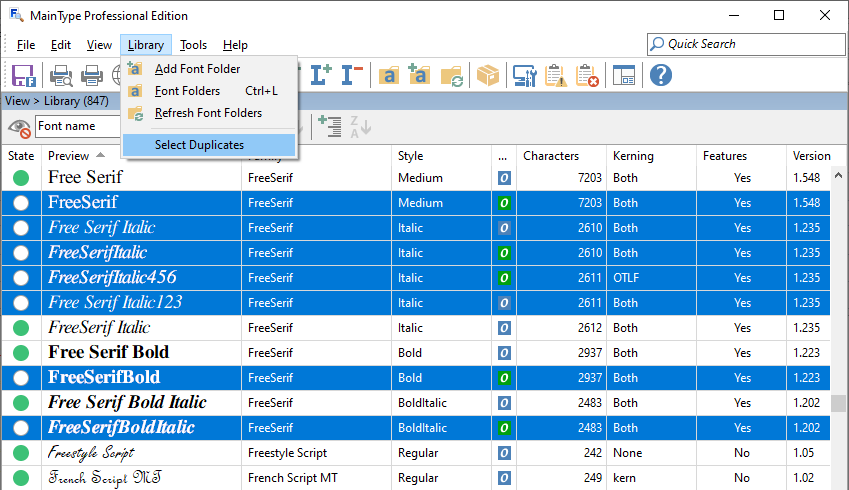
Go to Library → Select Duplicates.

MainType analyzes the current scope (Library, a View, or a Group) and automatically selects duplicate font files so you can review them immediately.

What MainType selects (and what it keeps)

When multiple similar fonts exist, MainType generally keeps the best candidate unselected and selects the others, so you can clean up faster without guesswork. Quick rule of thumb:

  • Unselected fonts = recommended to keep
  • Selected fonts = duplicates to review/remove

MainType determines which version is most important based on these criteria, in order:

  • Version - Higher version number is considered more important
  • Variable - Variable fonts are prioritized over static fonts
  • Modified - More recently modified fonts are preferred
  • Created - More recently created fonts are preferred
  • Glyphs - Fonts with more glyphs are considered more complete
  • Characters - Fonts with more characters have better coverage
  • File size - Larger files may contain more data

Step 3 — Compare duplicates in Details View (optional, but recommended)

Want to double-check before deleting? Details View makes it easy to compare versions side-by-side.

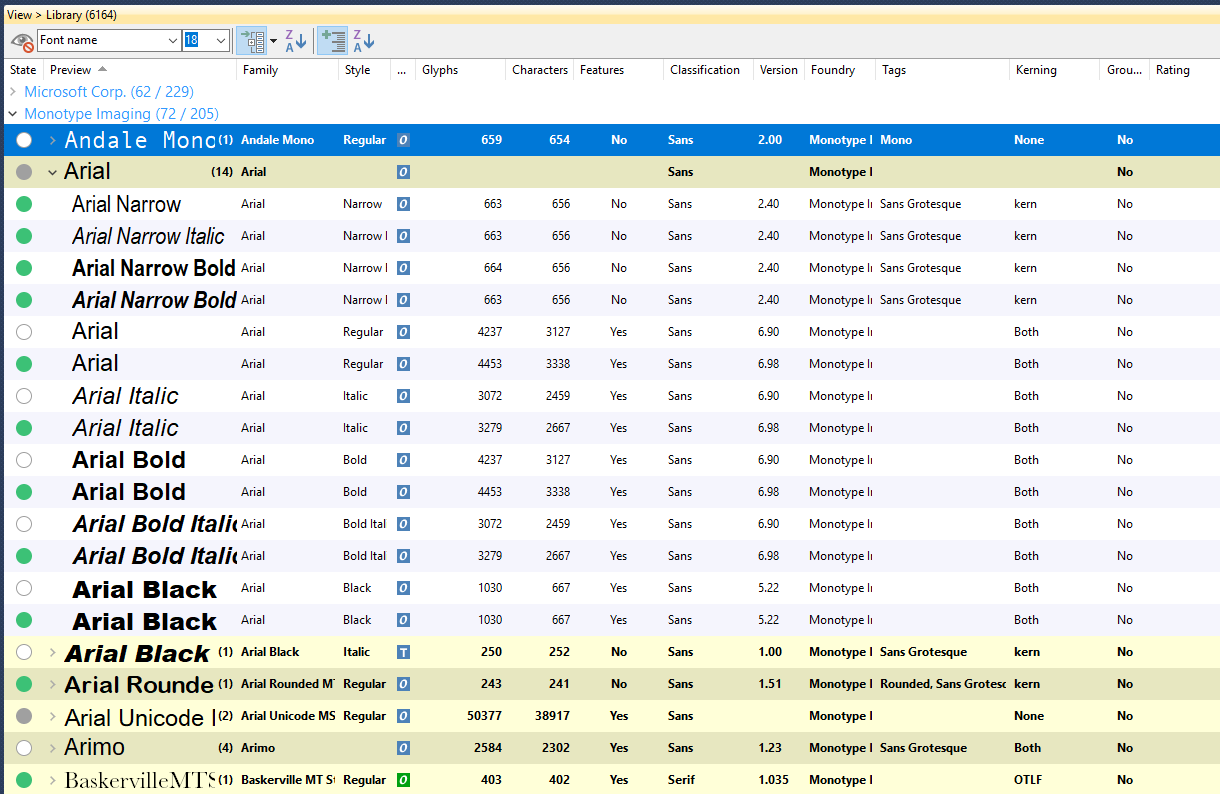
In Details View, each font is displayed on its own row. By default, MainType shows thirteen columns, but you can customize the list:

  • Show/hide columns: right-click a column header and toggle columns on/off
  • Resize columns: drag the vertical separators between headers
  • Reorder columns: drag a column header left/right
  • Sort: click a column header to sort by that column

These are all available columns:

State, Preview, Full Font Name, Family, Style, Type, Regular, Italic, Symbol, Mono, Embedding, Glyphs, Characters, Kerning, Features, Classification, Sample Text, Weight, Width, Version, Foundry, Rating, Note, Tags, Grouped, Date Created, Date Modified, Date Added, and File Size.

Columns that are most useful for duplicate cleanup

Enable a few key columns so “best version vs outdated version” becomes obvious at a glance:

Version, Date Modified / Date Created, File Size, Glyphs / Characters, Foundry, Embedding, Features / Kerning, Type, Full Font Name, Family, Style, State

Adjust the selection (if needed)

If you prefer a different version than MainType’s choice:

Ctrl+Click any font to toggle its selection.

Step 4 — Delete the selected duplicates

Once you’re happy with the selection:

Press Delete (or choose Edit → Delete).

In the Delete dialog, select the options you want (for example removing from groups/library and deleting font files from disk).

Confirm to complete the cleanup.

In minutes, you’ve removed outdated font files and made your MainType library easier to maintain.

Download Confirmation

Download MainType

Download MainType 64-bit (recommended)

We recommend to download and install the above 64-bit version, but you can also download MainType 32-bit in case your Windows version does not support 64-bit software.

While downloading

Product Support

If you are having issues with our products please visit the support page which helps with frequently asked questions, tutorials, and the user manual.

Forum

Check out our forum as it contains tips, tricks, and a lot of solutions to common problems. The forum is a place where users of our software share their knowledge.

Download Update Windows

Download MainType

Download MainType

We recommend to download and install the above 64-bit version of our font manager, but you can also download MainType 32-bit in case your Windows version does not support 64-bit software.

This update includes several improvements and bug fixes. For a detailed list of changes, please visit the changelog page.

While downloading

Tutorials

MainType has many features that allow you to manage your fonts. These tutorials will explain both basic and advanced topics.

Forum

Check out our forum as it contains tips, tricks, and a lot of solutions to common problems. The forum is a place where users of our software share their knowledge.

Download Upgrade Windows

Download MainType

Download MainType

We recommend to download and install the above 64-bit version our font manager, but you can also download MainType 32-bit in case your Windows version does not support 64-bit software.

Discover the New Features in MainType 13

MainType 13 delivers a fresh browsing experience and a host of workflow refinements—everything you need to manage even the largest font libraries with ease.

Brand-new Grid View

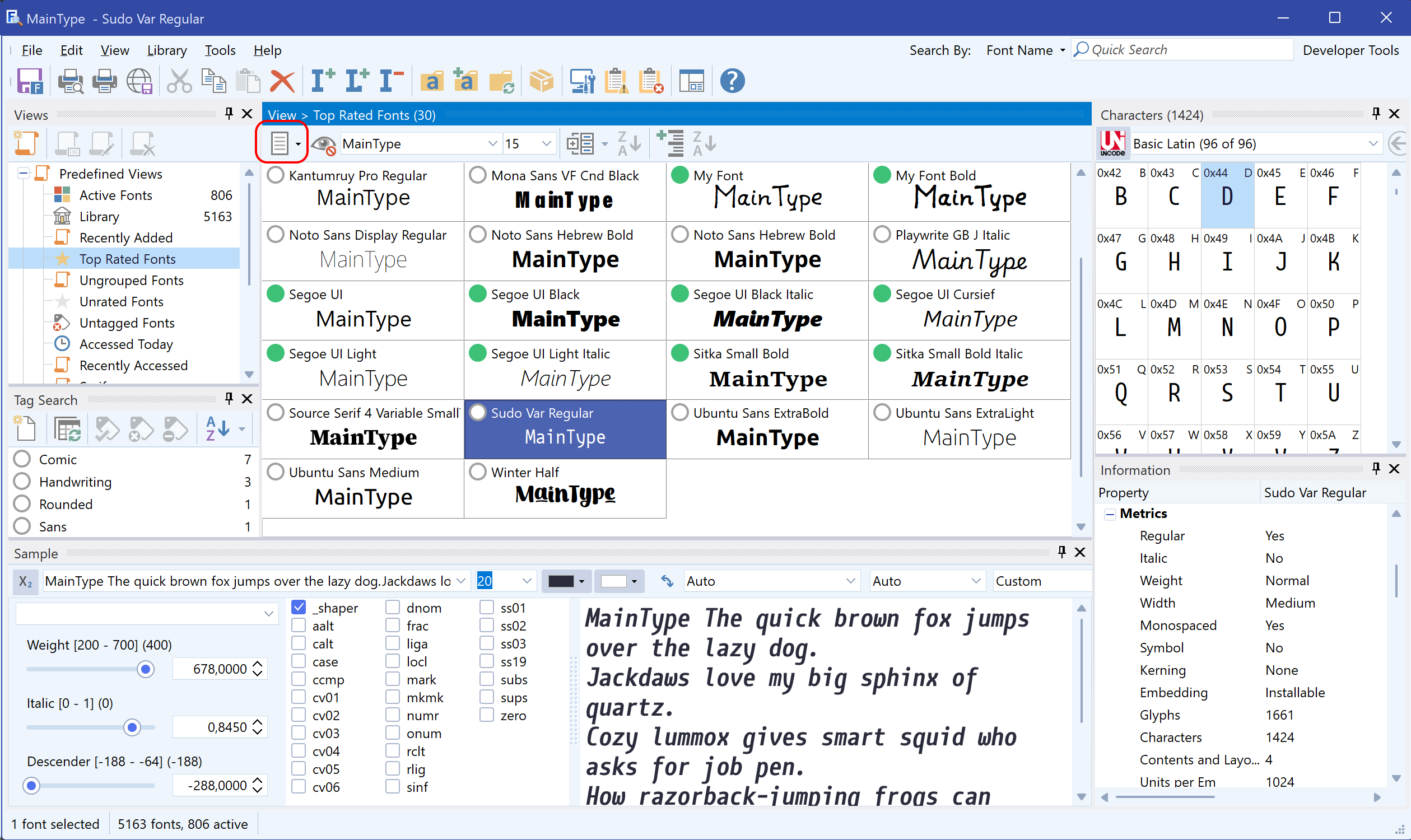
Switch instantly between the classic Details View and the new Grid View to scan fonts as large, uniform thumbnails—perfect for spotting duplicates or choosing the ideal weight at a glance.

Enhanced OpenType Layout Handling

Kerning, stylistic alternates, and complex-script shaping are more accurate than ever, ensuring faithful previews before you activate.

Theme & Usability Refinements

Broader UI-language coverage and dozens of subtle tweaks make daily font management smoother all around.

Upgrade to MainType 13 today and explore the new Grid View, smarter export options, and Unicode 17 readiness. Questions or feedback? Join the conversation in our forum!

Upgrade Now

EULA

MainType License Agreement

MAINTYPE is copyright © 2004-2024 by High-Logic B.V. (hereinafter "HIGH-LOGIC"), all rights reserved.

IMPORTANT-READ CAREFULLY: This End-User License Agreement (hereinafter the "EULA") is a legal agreement between you (either an individual or a single entity) and HIGH-LOGIC for MAINTYPE, which includes any associated software components and any "online" or electronic documentation (hereinafter the "SOFTWARE"). By installing, copying, or otherwise using the SOFTWARE, you agree to be bound by the terms of this EULA.

IF YOU DO NOT AGREE TO THE TERMS OF THIS EULA, DO NOT USE THIS SOFTWARE. PROMPTLY REMOVE IT FROM YOUR COMPUTER.

1. OWNERSHIP OF SOFTWARE.
The SOFTWARE is licensed, not sold.
HIGH-LOGIC retains the copyright, title and ownership of the SOFTWARE and the written materials regardless of the form or media in or on which the original and other copies may exist.

2. GRANT OF LICENSE.
  (a)  Free Edition.  Even though a license fee is not paid for the use of Free Edition, it does not mean that there are no conditions for using the SOFTWARE.  The Free Edition can only be used by a non-commercial entity for personal, educational and non-commercial use. The one and only exception is during the evaluation period (for 30 days from the day that you install the Software) in which the SOFTWARE may also be used by a commercial entity without charge.  This EULA terminates automatically if you fail to comply with any provision of this EULA.  Upon termination you shall remove the SOFTWARE from your computer(s).

  (b)  Redistribution of Evaluation Copy.  If you are using SOFTWARE on an evaluation basis you may make copies of the evaluation SOFTWARE as you wish; give exact copies of the original evaluation SOFTWARE to anyone; and distribute the evaluation SOFTWARE in its unmodified form via electronic means (Internet, BBS's, Shareware distribution libraries, CD-ROMs, etc.). You may not charge any fee for the copy or use of the evaluation SOFTWARE itself, but you may charge a distribution fee that is reasonably related to any cost you incur distributing the evaluation SOFTWARE (e.g. packaging). You must not represent in any way that you are selling the software itself. Your distribution of the evaluation SOFTWARE will not entitle you to any compensation from HIGH-LOGIC.  You must distribute a copy of this EULA with any copy of the Software and anyone to whom you distribute the Software is subject to this EULA.  HIGH-LOGIC reserves the right to revoke distribution rights from anyone at any time without cause.

 (c) Registered Copy. After you have purchased a single-user license for the SOFTWARE and have received the file enabling the registered copy, you are licensed to install and use the SOFTWARE on multiple computers, provided that you are the sole user of the SOFTWARE.  If the SOFTWARE is purchased by an organization, one designated individual within the organization is licensed to install and use the SOFTWARE on multiple computers, provided that only that individual uses the SOFTWARE.  Under no circumstances may the SOFTWARE be used by more than one individual per license.  You may not allow others to use, copy, or install the SOFTWARE.  You may not duplicate the SOFTWARE in whole or in part, except that you may make one copy for backup or archival purposes.  You may terminate this license at any time by destroying the original and all copies of the SOFTWARE in whatever form.  You may permanently transfer all of your rights under this EULA, provided you are the first licensed user of the software, and you transfer all copies of the SOFTWARE (including copies of all prior versions if the SOFTWARE is an upgrade) and retain none, and the recipient agrees to the terms of this EULA.

3. RESTRICTIONS.
You may not reverse engineer, decompile, or disassemble the SOFTWARE, except and only to the extent that such activity is expressly permitted by applicable law notwithstanding this limitation. You may not rent, lease, or lend the SOFTWARE. You may permanently transfer all of your rights under this EULA, provided the recipient agrees to the terms of this EULA. If the SOFTWARE is an upgrade, any transfer must include all prior versions of the SOFTWARE. You may not use the SOFTWARE to perform any unauthorized transfer of information (e.g. transfer of files in violation of a copyright) or for any illegal purpose.

4. CONSENT TO USE OF DATA.
You agree that HIGH-LOGIC may collect, maintain, process and use diagnostic, technical and related information about the SOFTWARE and your system, that is gathered periodically to facilitate the provision of software updates, product support, and to verify compliance with the terms of this EULA. HIGH-LOGIC may use this information to improve products or to provide services to you.

5. SUPPORT SERVICES.
HIGH-LOGIC may provide you with support services related to the SOFTWARE. Use of Support Services is governed by the HIGH-LOGIC polices and programs described in online documentation, and/or other HIGH-LOGIC-provided materials, as they may be modified from time to time. Any supplemental software code provided to you as part of the Support Services shall be considered part of the SOFTWARE and subject to the terms and conditions of this EULA. With respect to technical information you provide to HIGH-LOGIC as part of the Support Services, HIGH-LOGIC may use such information for its business purposes, including for product support and development. HIGH-LOGIC will not utilize such technical information in a form that personally identifies you.

6. TERMINATION.
Without prejudice to any other rights, HIGH-LOGIC may terminate this EULA if you fail to comply with the terms and conditions of this EULA. In such event, you must destroy all copies of the SOFTWARE.

7. COPYRIGHT.
The SOFTWARE is protected by United States copyright law and international treaty provisions. You acknowledge that no title to the intellectual property in the SOFTWARE is transferred to you. You further acknowledge that title and full ownership rights to the SOFTWARE will remain the exclusive property of HIGH-LOGIC and you will not acquire any rights to the SOFTWARE except as expressly set forth in this license. You agree that any copies of the SOFTWARE will contain the same proprietary notices which appear on and in the SOFTWARE.

8. NO WARRANTIES.
HIGH-LOGIC expressly disclaims any warranty for the SOFTWARE. THE SOFTWARE AND ANY RELATED DOCUMENTATION IS PROVIDED "AS IS" WITHOUT WARRANTY OF ANY KIND, EITHER EXPRESS OR IMPLIED, INCLUDING, WITHOUT LIMITATION, THE IMPLIED WARRANTIES OR MERCHANTABILITY, FITNESS FOR A PARTICULAR PURPOSE, OR NONINFRINGEMENT. THE ENTIRE RISK ARISING OUT OF USE OR PERFORMANCE OF THE SOFTWARE REMAINS WITH YOU.

9. LIMITATION OF LIABILITY.
IN NO EVENT SHALL HIGH-LOGIC OR ITS SUPPLIERS BE LIABLE TO YOU FOR ANY CONSEQUENTIAL, SPECIAL, INCIDENTAL, OR INDIRECT DAMAGES OF ANY KIND ARISING OUT OF THE DELIVERY, PERFORMANCE, OR USE OF THE SOFTWARE, EVEN IF HIGH-LOGIC HAS BEEN ADVISED OF THE POSSIBILITY OF SUCH DAMAGES. IN ANY EVENT, HIGH-LOGIC'S LIABILITY FOR ANY CLAIM, WHETHER IN CONTRACT, TORT, OR ANY OTHER THEORY OF LIABILITY WILL NOT EXCEED THE GREATER OF U.S.$1.00 OR LICENSE FEE PAID BY YOU.

Should any other warranties be found to exist, such warranties shall be limited in duration to ninety (90) days following the date of delivery to you. In no event will High-Logic's liability for any damages to you or any other person exceed the amount paid for the license to use the SOFTWARE.

10. THIRD PARTY SOFTWARE.
The SOFTWARE contains several unmodified libraries that are available under MPL.
Virtual Treeview from http://soft-gems.net/;
EasyListview from http://www.mustangpeak.net/

Acknowledgments
BY USING MAINTYPE, YOU ACKNOWLEDGE THAT YOU HAVE READ THIS EULA, UNDERSTAND IT, AND AGREE TO BE BOUND BY ITS TERMS AND CONDITIONS. YOU ALSO AGREE THAT THE LIMITED WARRANTY IS THE COMPLETE AND EXCLUSIVE STATEMENT OF AGREEMENT BETWEEN THE PARTIES AND SUPERSEDES ALL PROPOSALS OR PRIOR AGREEMENTS, ORAL OR WRITTEN, AND ANY OTHER COMMUNICATIONS BETWEEN THE PARTIES RELATING TO THE SUBJECT MATTER OF THE LIMITED WARRANTY.


Should you have any questions concerning this EULA, or if you desire to contact HIGH-LOGIC for any reason, please contact HIGH-LOGIC at:
https://www.high-logic.com/

November 2024

Tutorials

MainType – Tutorials

Get started with MainType through these tutorials. The tutorials are very short because MainType is so easy to use. Suggestions for new tutorials are welcome.

Quick Start Tutorial

This short and easy font manager tutorial explains how to get started with MainType. Is explains how to add fonts to the MainType library, how to show OpenType layout features, tag fonts, and how to copy and paste characters.

How to Find and Remove Duplicate Fonts

Over time, you can collect multiple versions of the same fonts. Learn how MainType helps you find, compare, and delete duplicate font files to clean up your Windows font library fast.

Export Project Fonts for Clients and Printers

Learn how to export and package project fonts with MainType. Create organized font folders for clients, printers, and design teams while preserving folder structure. No more missing font chaos!

Shared Font Libraries for Teams

Keep fonts consistent across your team by syncing one shared font folder to every workstation. Ideal for avoiding missing fonts and version mismatches.

FmsConfig

MainType comes with a utility that allows you to make backups. This tutorial shows how to make and restore backups, and also covers some more advanced features.

FmsProxy

FmsProxy is a small program that runs in the background. It usually runs without issues, but if it no longer runs, read this tutorial.

Video Tutorials

A list of several video tutorials made by MainType users. They explain all about font folders, groups, tagging, custom views, sorting columns, creating font catalogues, printing and exporting fonts, and more.

No More Plugins

This tutorial explains why MainType 9 no longer includes plug-ins, and provides other ways to ensure your documents use the correct fonts.

650K Font Library

We consider a library with over 50,000 (fifty thousand) fonts a large library, but some of our customers have over 650,000 fonts which they happily manage with MainType.

FAQ

MainType

FAQ

Before consulting this list, please check to make sure you are running the latest version. Please consult the MainType changelog to see the current version as available for download. To see the version within your software, do open the About box which is available through the Help menu item.

Frequently Asked Questions

  • How can MainType help me organise thousands of fonts?

    Use Groups, Tags and powerful search filters to slice your library by project, client, foundry, rating or any custom keyword. Unlike the basic Windows Fonts folder, MainType lets you load or unload entire groups with one click—keeping active fonts lean and your creative workflow fast.

  • Is MainType compatible with Windows 11 and high-DPI monitors?

    Yes. MainType is fully tested on Windows 11 and scales crisply on high-DPI or 4K displays—an essential detail for pixel-perfect font management.

  • Is MainType available for macOS or Linux?

    MainType is a Windows-only font manager. You can run it on Windows 11, 10, 8 or 7; macOS users would need a virtual machine such as Parallels running Windows to use MainType.

  • Does MainType have a free edition and what are its limits?

    Absolutely. The MainType free edition never expires, manages up to 2,500 fonts, and includes core viewing, installing and uninstalling features on Windows. Upgrade to Standard or Professional editions for unlimited libraries, automatic tagging, font registry repair and other power-user tools.

  • Does MainType support variable fonts and advanced OpenType features?

    Yes. MainType is the most complete Windows-native font manager for variable fonts. Since version 11 it supports live axis sliders, rich OpenType previews, named-instance browsing, kerning and stylistic-set tests—all available even in the free edition. Competing Windows font management tools may recognise variable fonts, but none match MainType’s full slider-based inspection and library filters.

  • What’s the difference between the Details view and Grid view

    MainType comes with two complementary browsing modes: Details view keeps the classic column list with exhaustive metadata (family, style, foundry, tags, activation status, etc.) for precise font management, while the new Grid view turns that list into a gallery of large thumbnails so you can judge letterforms at a glance; a single toolbar icon or View → Grid/Details toggles between them.

  • Does MainType auto-activate fonts in Adobe Creative Cloud?

    Auto-activation plug-ins for legacy Adobe apps (e.g., InDesign CC 2017/2018) were discontinued. Today the recommended workflow is to install required fonts from MainType before opening a document; once installed, the fonts appear instantly in Photoshop, Illustrator or InDesign without restarting.

  • Is the MainType user manual available in other languages?

    At present the user manual is only in English, although the MainType interface itself is translated into several languages.

If your question isn't answered here, do visit our forum as it contains useful information and it allows you to post questions that are likely to be answered within a couple of hours.

Promote

MainType – Promote

Our font manager is used by many people, but there are still way more people who never heard about it. Since you seem to like MainType, it would be great if you took a minute or two to let your friends know about it.

We kindly ask you to tweet about it, or if you know an appropriate Facebook group, let them know. It really helps us, maybe one or two people decide to buy a license, which will allow us to continue to improve our software, so thank you for your support!

Last but not least, if you really love our font manager, please take a couple of minutes to write a short recommendation here:

https://alternativeto.net/software/maintype/about/

Thank you for your support!

In case you do have issues with our font manager, do let us know. We are here to help and we always want to improve our software.

Comparison Chart

MainType

Comparison Chart

Free Standard Professional
Price in US$ FREE 49.00 79.00
License Restrictions
Can be used for commercial purposes No Yes Yes
Maximum number of fonts allowed in the font library
2500 10000 unlimited!
Font Management
Load, install, and uninstall fonts Yes Yes Yes
Preview and browse fonts Yes Yes Yes
Export fonts No Yes Yes
Custom font views
No No Yes
Custom font groups
Yes Yes Yes
Detailed font comparison pane Yes Yes Yes
Add notes to fonts Yes Yes Yes
Rate fonts Yes Yes Yes
Font categorization Yes Yes Yes
Font tagging Yes Yes Yes
Advanced Features
Show OpenType layout features in Sample panel Yes Yes Yes
Show vector-based color fonts in Sample panel Yes Yes Yes
Unicode character grid
Yes Yes Yes
Keep folders in sync — Team synchronization
Yes Yes Yes
Auto install fonts after synchronization
No No Yes
Invalid and corrupt font detection Yes Yes Yes
System font protection Yes Yes Yes
Select duplicates
Yes Yes Yes
Font registry fixer No No Yes
Other Features
Fully customizable layouts
Yes Yes Yes
Print and print preview Yes Yes Yes
HTML export No Yes Yes
Import and export font ratings and tags Yes Yes Yes
Backup and restore Yes Yes Yes
  FREE Buy Buy

Features and Benefits

MainType

Features and Benefits

MainType is packed with tons of intuitive features. Here is a list that shows the most important features and benefits. For more detailed feature descriptions, do consult the manual and the forum.

  • Load, install, and uninstall fonts without a User Access Control (UAC) prompt—MainType works even for users with restricted rights
  • Switch instantly between Details View and the new Grid View to browse fonts as large thumbnails or in a tree list
  • Font activation for all your software, including Adobe InDesign, Illustrator, Photoshop, and Microsoft Word
  • Preview and browse fonts without installing them first
  • Variable-font support with on-screen axis sliders
  • Show all available OpenType layout features—now with tighter shaping for kerning, alternates, and complex scripts
  • Team synchronization through keep-in-sync folders
  • Full Unicode 17 support for the very latest symbols, scripts, and emoji
  • Can easily handle huge libraries—we’ve tested with more than a million fonts
  • Select duplicate fonts
  • Detect invalid and corrupt fonts
  • Resolve font conflicts
  • Export Groups with Folder Structure—right-click any group to package fonts while preserving the original hierarchy
  • Ignore Fonts you don’t want to see, without uninstalling them
  • Character grid with Unicode-block navigation
  • Network support lets you use fonts stored on a network drive
  • Refreshed foundry list applied automatically on new installations
  • Custom font notes
  • Custom font rating
  • Advanced font tagging
  • Advanced categorizing and search capabilities
  • Print and print-preview your fonts
  • Supports all popular font formats and more: TrueType (TTF), OpenType (OTF), TrueType Collections, OpenType Collections, Variable Fonts, Color Fonts, PostScript Type 1 fonts
  • Insert characters into background applications
  • Font-export wizard generates an HTML overview of all your fonts
  • Automatically install fonts from watched folders
  • Import and export font ratings and tags
  • Easy backup and restore of your font library

    Download

    Download MainType

    MainType runs on Windows 11, 10, 8, and 7. It does not have an expiration date as it runs in free edition mode.

    Please complete the following form to access the free MainType download.


    Click here if you want instant access to the download.

    Older versions

    If you own a license for a previous version of our software, you can download such older version through the retrieve lost registration code(s) page.

    Changelog

    MainType

    Changelog

    • MainType 13.0.0.1365 [July 29, 2025]

      • Improved performance when working with font libraries that make heavy use of Tags.
      • Fixed a rare issue with variable fonts that do not include the default instance.
      • Enhanced Italian localization.
    • MainType 13.0.0.1364 [July 25, 2025]

      • Fixed an instability issue.
      • Expanded UI language support, with additional translations added.
      • Several minor tweaks.
    • MainType 13.0.0.1345 [May 26, 2025]

      • Optimized grid cell sizing on standard-DPI monitors, so previews render at the correct dimensions.
      • “View Icons” relabeled to “View Grid” in the UI, matching everywhere else.
      • Expanded UI language support, with additional translations added.
      • New setting to hide license information from the window’s title bar.
    • MainType 13.0.0.1344 [May 21, 2025]

      • New Grid View – browse any group or folder as large thumbnails and toggle back to Details View with one click.
      • Export Groups with Folder Structure – right-click a group to package its fonts while preserving the entire hierarchy.
      • Unicode database updated to Version 17 – full coverage of the latest scripts, symbols, and emoji.
      • Refreshed foundry list – cleaner, up-to-date foundry names applied automatically on new installations.
      • Enhanced OpenType layout handling – more accurate kerning, alternates, and complex-script shaping.
      • Theme refinements – sharper rendering in both light and dark modes, plus better high-DPI support.
      • Wider UI language coverage – additional interface translations and updated existing locales.
      • General usability improvements – faster context menus, clearer status cues, and dozens of small workflow tweaks.
      • Miscellaneous bug fixes and stability enhancements.
    • MainType 12.0.0.1340 [January 14, 2025]

      • Added Italian and improved localization support for other languages
      • Fixed issue with detecting installed Type 1 fonts
    • MainType 12.0.0.1339 [November 4, 2024]

      • Changed selection preference of duplicate fonts
      • Fixed issue with deleting from invalid font resources on a network drive
    • MainType 12.0.0.1337 [October 31, 2024]

      • Fixed issue with copy and paste fonts
      • Fixed issue with deleting from invalid font resources
      • Several minor enhancements
    • MainType 12.0.0.1335 [October 29, 2024]

      • Added localization support for Spanish
      • Added support for CFF2 based (variable) fonts
      • Fixed issue with panels not staying on top
      • Several minor enhancements
    • MainType 12.0.0.1334 [October 15, 2024]

      • Added localization support for the user interface: now also available in Indonesian and Chinese
      • Several minor enhancements
    • MainType 12.0.0.1332 [October 9, 2024]

      • Added localization support for the user interface: now available in English, German, Dutch, French, and Korean
      • Added additional dark theme: Polar Dark
      • Fixed stability issue
    • MainType 12.0.0.1318 [May 3, 2024]

      • Improved starting MainType
    • MainType 12.0.0.1315 [April 30, 2024]

      • Fixed gaps in Views panel
      • Improved high DPI support
      • New light and dark themes
      • Numerous enhancements and improvements
    • MainType 12.0.0.1312 [March 8, 2024]

      • Fixed stability issues
      • Improved high DPI support
      • Numerous enhancements and improvements
    • MainType 12.0.0.1300 [December 15, 2023]

      • Fixed stability issue
      • Fixed issue with license activation
    • MainType 12.0.0.1299 [December 14, 2023]

      • Fixed stability issue
    • MainType 12.0.0.1297 [November 14, 2023]

      • Fixed stability issue
    • MainType 12.0.0.1296 [November 11, 2023]

      • Fixed search by font name flaw
    • MainType 12.0.0.1293 [September 1, 2023]

      • Improved export of loaded fonts
    • MainType 12.0.0.1290 [August 19, 2023]

      • Fixed issue related to continuous synchronization of libraries folders
    • MainType 12.0.0.1288 [August 17, 2023]

      • Improved sliders for variable fonts in Sample panel
      • Improved support for OpenType layout features
      • Improved theme support
      • Improved usability
      • Improved high DPI support
      • Numerous enhancements and improvements
    • MainType 11.0.0.1282 [December 12, 2022]

      • Added context menu for tagging fonts
      • Fixed rare freeze issue with corrupt font
    • MainType 11.0.0.1280 [November 22, 2022]

      • Fixed variable font interpolation issue
    • MainType 11.0.0.1279 [November 21, 2022]

      • Fixed refresh issue within tag manager
      • Several other improvements
    • MainType 11.0.0.1277 [October 11, 2022]

      • Fixed stability issue
      • Several other improvements
    • MainType 11.0.0.1274 [August 23, 2022]

      • Fixed row height issue with mixed dpi monitors
      • Fixed background image color issue in Dark Theme
      • Fixed rare issue related to processing corrupt fonts
      • Fixed search by flaw
      • Added support for drag-n-drop font families
      • Several other improvements
    • MainType 11.0.0.1268 [May 21, 2021]

      • Fixed save layout issue
      • Fixed rare variable font load issue
      • Fixed a rare issue where the software hangs due to a bug introduced in an earlier version
      • Several minor improvements
    • MainType 11.0.0.1265 [May 19, 2021]

      • Improved support for variable fonts with axis sliders
      • Improved support for OpenType layout features
      • Improved network support
      • Updated list of registered foundries
      • Several other minor improvements
    • MainType 10.0.0.1239 [August 27, 2020]

      • Improved support for variable fonts
      • Added a swap colors button to the sample panel
      • Several other minor improvements
    • MainType 10.0.0.1235 [July 24, 2020]

      • Fixed preview draw issue with unloaded fonts
      • Added vertical scrollbar to OpenType layout features in Sample panel
      • Redesigned and improved find character feature
    • MainType 10.0.0.1229 [July 14, 2020]

      • New OpenType layout features in Sample panel
      • New Note panel to add a custom note to your fonts
      • New dark theme
      • Show sample text
      • Improved high DPI support
      • Improved PANOSE output
      • Added Safe Mode, so you can delete fonts that are causing trouble
      • Update vendor information
      • Expanded custom views with a total of 3 features
      • More metrics in Information panel
      • Numerous enhancements and improvements
    • MainType 9.0.0.1207 [February 21, 2020]

      • Fixed link to user manual in Welcome dialog
      • Reduced error reporting in case the font editor raises an exception or crashes
    • MainType 9.0.0.1203 [February 17, 2020]

      • Several performance improvements
    • MainType 9.0.0.1199 [February 7, 2020]

      • Font family is now used for both sort and search; used to be full font name
      • Fixed bug related to copy/move font resources
      • Improved high DPI support
      • Other user interface improvements
    • MainType 9.0.0.1183 [January 23, 2020]

      • Fixed an issue with features field in custom views
      • New option to delete root folder from groups view
      • Improved high DPI support
      • Improved check for updates
    • MainType 9.0.0.1181 [January 14, 2020]

      • Major performance improvement related to sync folders with a lot of font folders
      • More stability improvements
      • Improved behaviour related to show zoom popup option
    • MainType 9.0.0.1177 [January 10, 2020]

      • Fixed an issue with resource field in custom views
      • Fixed an issue within font indexer that could cause an endless loop
      • Fixed a rare stability issue that could crash the software
      • Fixed issue within progress information panel
      • Improved high DPI support
    • MainType 9.0.0.1163 [December 12, 2019]

      • New option to copy font information to clipboard
      • Several enhancements and bug fixes
    • MainType 9.0.0.1151 [July 17, 2019]

      • Smart font install
      • Select duplicates feature
      • Speed improvements due to new font preview cache
      • Improved display of similar fonts
      • Unicode 12.1 support
      • Fully compatible with Windows 10 May 2019 Update (version 1903)
      • Numerous enhancements and improvements
    • MainType 8.0.0.1135 [April 16, 2018]

      • Fixed issue with font previews
    • MainType 8.0.0.1134 [April 3, 2018]

      • Fixed registry startup issue
    • MainType 8.0.0.1132 [February 22, 2018]

      • Fixed issue with 32 bit installer
      • Several minor enhancements
    • MainType 8.0.0.1127 [January 21, 2018]

      • Fixed rare issue (known as problem 0x73846223)
    • MainType 8.0.0.1126 [January 19, 2018]

      • Fixed issue with InDesign CS6 plugin
      • Fixed rare upgrade issue
    • MainType 8.0.0.1125 [January 18, 2018]

      • Fixed rare issue "Cannot convert NULL field to INTEGER"
      • Fixed plugin signature check
      • Fixed issue with opening type 1 font location
      • Fixed rare issue with installing type 1 fonts
      • Fixed issue within update check feature
      • Updated the manual
    • MainType 8.0.0.1122 [January 17, 2018]

      • Support for variable fonts
      • New icon set (and improved High DPI / Large Fonts support)
      • New font properties (Classification, Panose, Kern, and OpenType Features)
      • Updated the font foundry list
      • New Adobe InDesign CC plugins (2017 and 2018)
      • New option to open font file location in explorer
      • Enhanced delete fonts functionality
      • New go to codepoint feature in character grid
      • Importing and exporting tags and ratings

    MainType

    MainType 13

    Version 13.0.0.1365 released on July 29, 2025

    A five-star rating for MainType according to user reviews MainType interface overview – advanced font manager displaying font library, groups, preview panel and tagging tools

    The best font manager I've ever seen!

    MainType is a powerful but easy to use font manager and font viewer for Windows, that takes the frustration out of managing your fonts. It is packed with tons of intuitive features that makes it simple to find, manage, preview, organize, install, and print your fonts. MainType is the only font manager for Windows that fully supports variable fonts and OpenType layout features.

    MainType is designed for graphic artists, typographers, and other power users who demand high-end functionality such as network support, advanced categorizing, and complex searching capabilities. The font manager provides immediate system-wide font synchronization, with no need to refresh font lists or reboot the computer after installing fonts. Unlike most other font managers, MainType runs without administrator credentials. This eliminates the frustrating elevation prompt when managing your fonts.

    MainType interface overview – advanced font manager switched from details to grid view

    Switch from the traditional list to a crisp, visual grid that displays every font as a large thumbnail—perfect for rapid browsing when inspiration (or a deadline) strikes.

    • Unicode Character Grid

      Easily navigate through Unicode blocks, copy characters to the clipboard, sample panel or directly insert them from the font manager into background applications.

    • Notes, Tags, and Ratings

      Add custom notes to your fonts, give them a rating, and tag your fonts with simple keywords and quickly find the font you need by searching for these keywords.
    • Customizable Layout

      MainType uses an advanced docking system that allows you to configure the layout the way you want! Whether you want your panels hidden, docked, floating or in tabs it's all possible.
    • In-depth Font Comparison

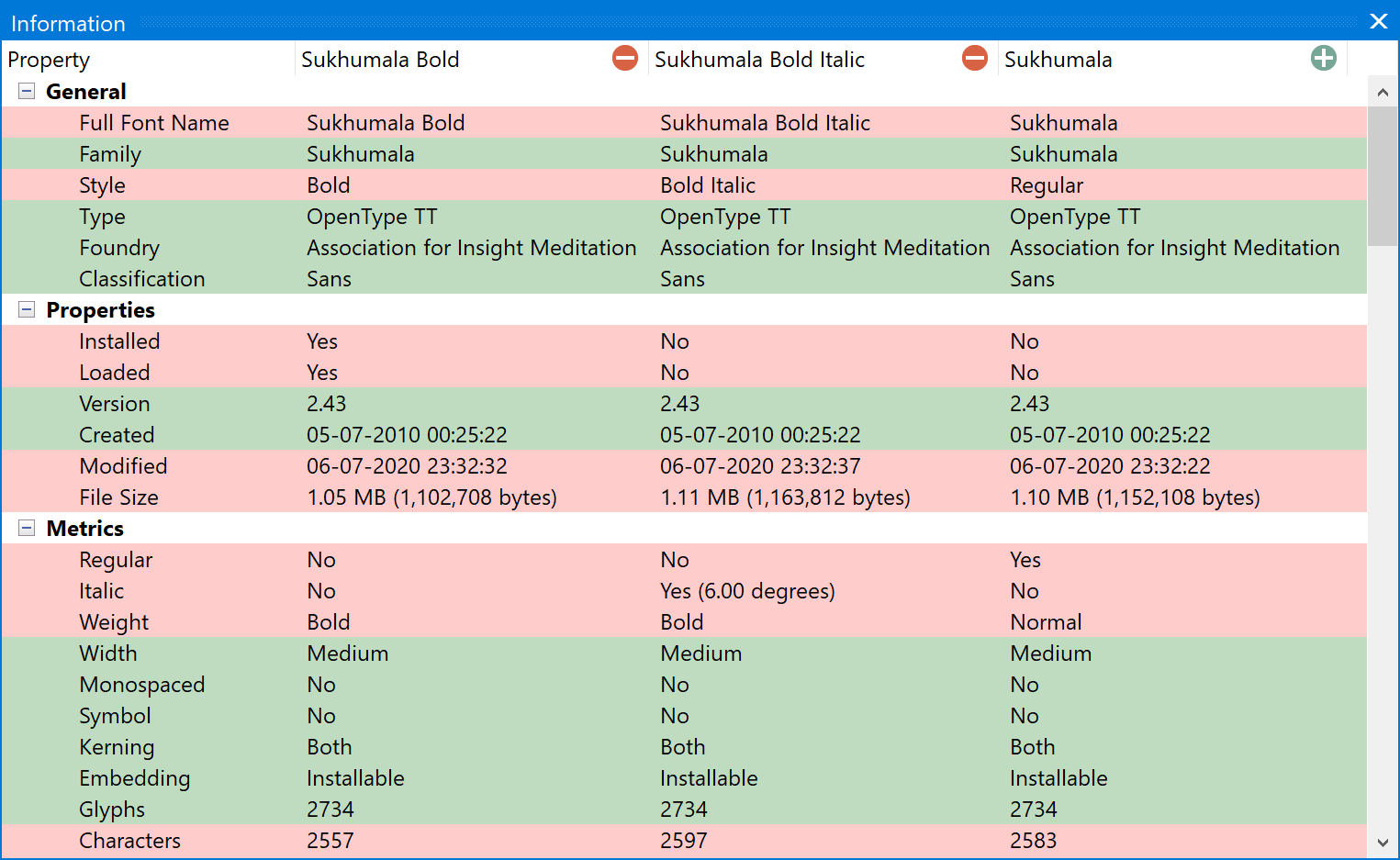
      Simply drag and drop up to 5 fonts onto the font information panel to compare font properties. This helps you identify which font version you want to use, uninstall, categorize, or print.
    • Print Reports

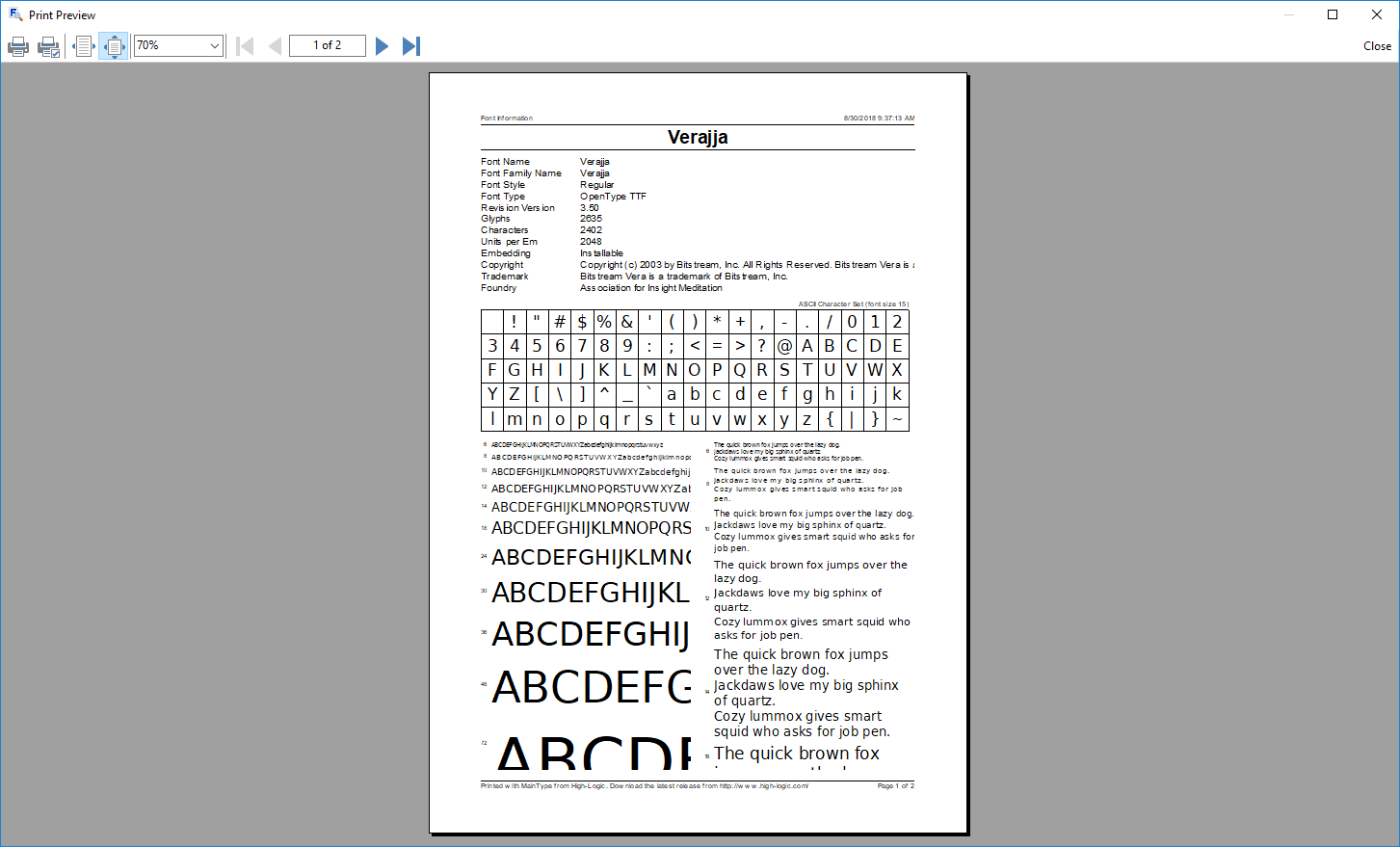
      Print samples of your fonts, and choose between four predefined reports. Optionally preview before printing, so you can be sure you print the font listings, character sets, or font information pages you want.
    • Team Synchronization

      Let MainType synchronize specific folders on your filesystem or network with special groups in the groups panel and you will always have an up to date list of your fonts.

    OpenType Layout Features

    Use the Sample panel to select which features you want to apply to the preview text, so that you can test a font’s OpenType layout features directly in the font manager. To enable this mode, click the X2 button. It also supports color fonts!

    • Corrupt Font Detection

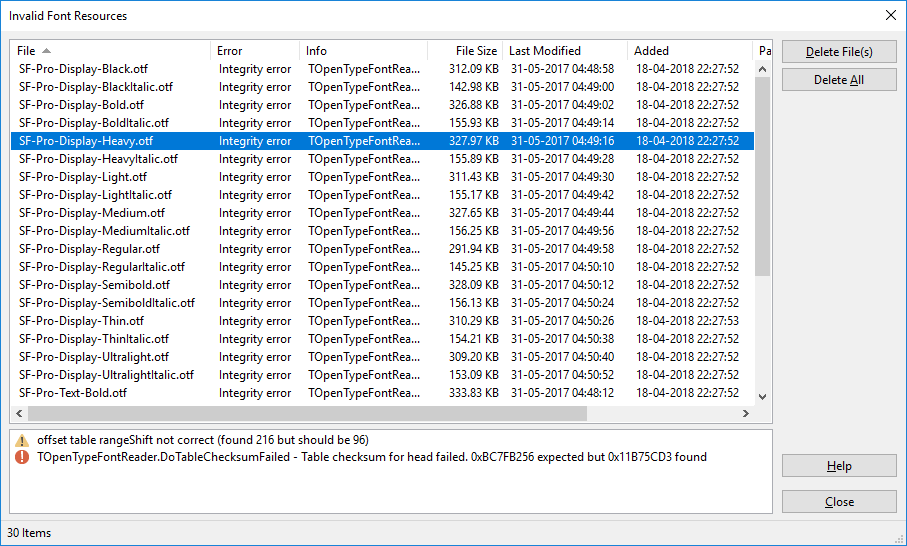
      Corrupt fonts could make your system unstable so MainType detects them and prevents them from showing up in your library. The "Invalid Font Resource" dialog allows you to view corrupt fonts and delete them.
    • Easy Backup and Restore

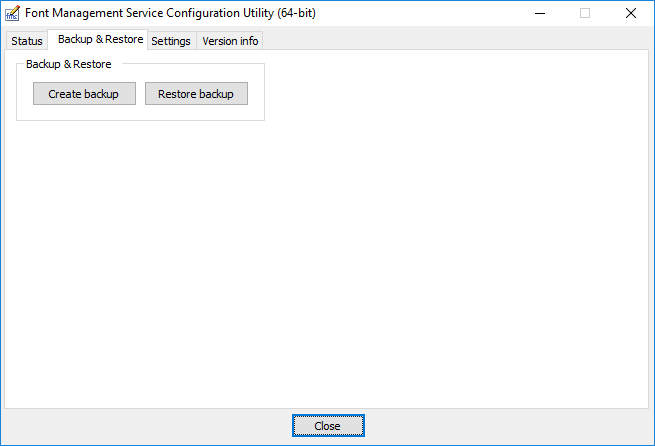
      The Font Management Service Config (FMSConfig) utility allows you to make quick and easy backups of your entire font library, tags, groups, settings with just a few mouse clicks.
    • Font Categorization

      MainType is a font manager that helps you categorize your fonts by foundry, font-type, rating, font width, and more. It also comes with an option to group your fonts by family.

    • Group Your Fonts

      Create font groups for birthdays, holidays, cars, animals, themes, or whatever needs you have and quickly load, install and uninstall them. This feature also allows graphic designers to manage fonts per project.

    • Repair Font Registry

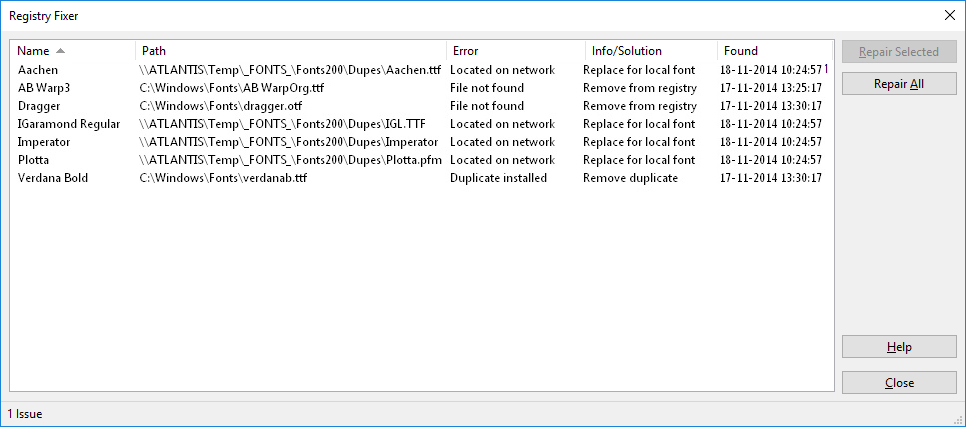
      The professional edition of MainType will automatically detect font registry issues such as missing and duplicate installed fonts. These issues can then be fixed with a single mouse click.
    • Duplicate Fonts

      Over the years your font collection might contain many duplicate fonts. Fortunatly this font manager has a feature that allows you to clean up your font library.

    What They're Saying

    • MainType has been rock solid and has all the features I need to manage the 4000+ fonts I have.

      Rick Bergeron

    • I've been using High-Logic MainType for years. Unlike other font managers, it is as fast as you can expect it to be. No bugs, no freezing.

      Yves Saint-Lary

    • MainType is the most flexible and easiest font management software I have worked with. I love it!

      Isabelle Mercier

    • I was using another font manager but MainType is so much easier to use. So glad I made this purchase.

      Lori Eckstein

    • No other font manager offers MainType’s blend of calligraphic nuance, technical expertise, and user-friendly adaptability—while still being fun to use.

      Eric Geneva

    • The latest version of MainType is a fantastic update! It completely solved the performance issues I was having. Even with complex fonts like monogram fonts, thumbnails now render instantly. By far the best font manager on the market.

      Robert Patterson

    • We would love to hear what you like about our font manager MainType. Let us know, so we can add it here. Thank you for your support!

    Free Download