A · Start Here
Installing or switching platforms? See FontCreator for Windows & macOS for system requirements, installation, project compatibility, and the differences between the Windows and macOS versions.

Create Your First Font in FontCreator
Start from scratch — set up a font, draw your first glyphs, install and test.

Edit an Existing Font Safely
Modify a font without breaking its OpenType features, kerning, metrics or line spacing.

Create a Font from an Image, Logo, Signature or Handwriting
Turn handwriting, signatures or logos into clean glyph outlines — what to scan, how to import.
B · Drawing, Importing & Editing Glyphs

Draw Better Glyph Outlines
Curvature comb, contour-direction arrows, marquee zoom and the Pen Tool 45° constraint.

Background, Helper Layers & Reference Artwork
FontCreator 16's layer model — trace, compare and keep work-in-progress as you design.

Import Vector Artwork
SVG, EPS, AI, PDF or paste from Illustrator/Inkscape/Affinity. Convert strokes to outlines first.

Using Masks to Build Non-Destructive Shapes
Subtract shapes for counters, rings and stencils — fully editable until export.

Designing with Strokes
Design from a centerline — set stroke width, caps and joins, then bake or export to filled outlines.

Glyph Spacing and Optical Metrics
Get spacing right before kerning, with automatic optical side-bearings.

Kerning & Autokerning
Adjust pairs by eye, scale with class kerning, generate pairs with Auto Kern, then test.

Batch Transform Glyphs: Small Caps & Oblique Fonts
Use the Glyph Transformer to bulk-edit glyphs — small capitals, obliques, old-style figures and more, generated automatically.
C · Reusable Design Parts

Smart Components
Build a parametric Smart Component — define an axis, add an alternate layer, reuse one interpolating shape everywhere.

Path Decorations
Attach reusable serifs, notches and ornamental caps to outline points — donor-driven and export-safe.

D · Characters, Accents & Composites

Glyph Name Convention
Why FontCreator's friendly glyph names matter for OpenType, composites and clean interchange.

Add Characters & Assign Unicode Codepoints
Why a drawn glyph won't type — add characters, assign codepoints, and when to use the Private Use Area.

Add Accents with Anchors & Complete Composites
Build accented characters and position marks the modern way — anchors, Complete Composites, ccmp / mark / mkmk.

Localized Forms: Turkish i, Romanian & Catalan
Make one font behave correctly per language with the OpenType locl feature — the Turkish dotted/dotless i, Romanian comma accents and the Catalan punt volat.
E · OpenType Features

Enrich Your Fonts with OpenType Features
Add ligatures, stylistic sets, swashes and alternate figures — generated from FontCreator's name convention.

OpenType Layout Features Unleashed
Use interactive proofing to see exactly which OpenType feature and lookup shaped your text — and debug complex fonts.

Fractions Using Reverse Chaining Substitution
Build a robust frac feature with reverse chaining (rsub) that leaves units and stray digits alone in running text.

Variable Contextual Kerning – Triplets
Fix three-glyph spacing problems pair kerning can't, with contextual kerning that can vary per location in a variable font.

Creating Connecting Handwritten Fonts
Make handwriting and script fonts feel organic with contextual alternates — word-position forms and pseudo-random rotation.
F · Variable & Color Fonts

How to Make a Variable Font
Build a variable font from existing styles — define axes and masters, preview interpolation, and export named instances.

Subsetting Variable Fonts
Slice a variable font to reduce its design space and file size — clamp axes, drop axes, extrapolate.
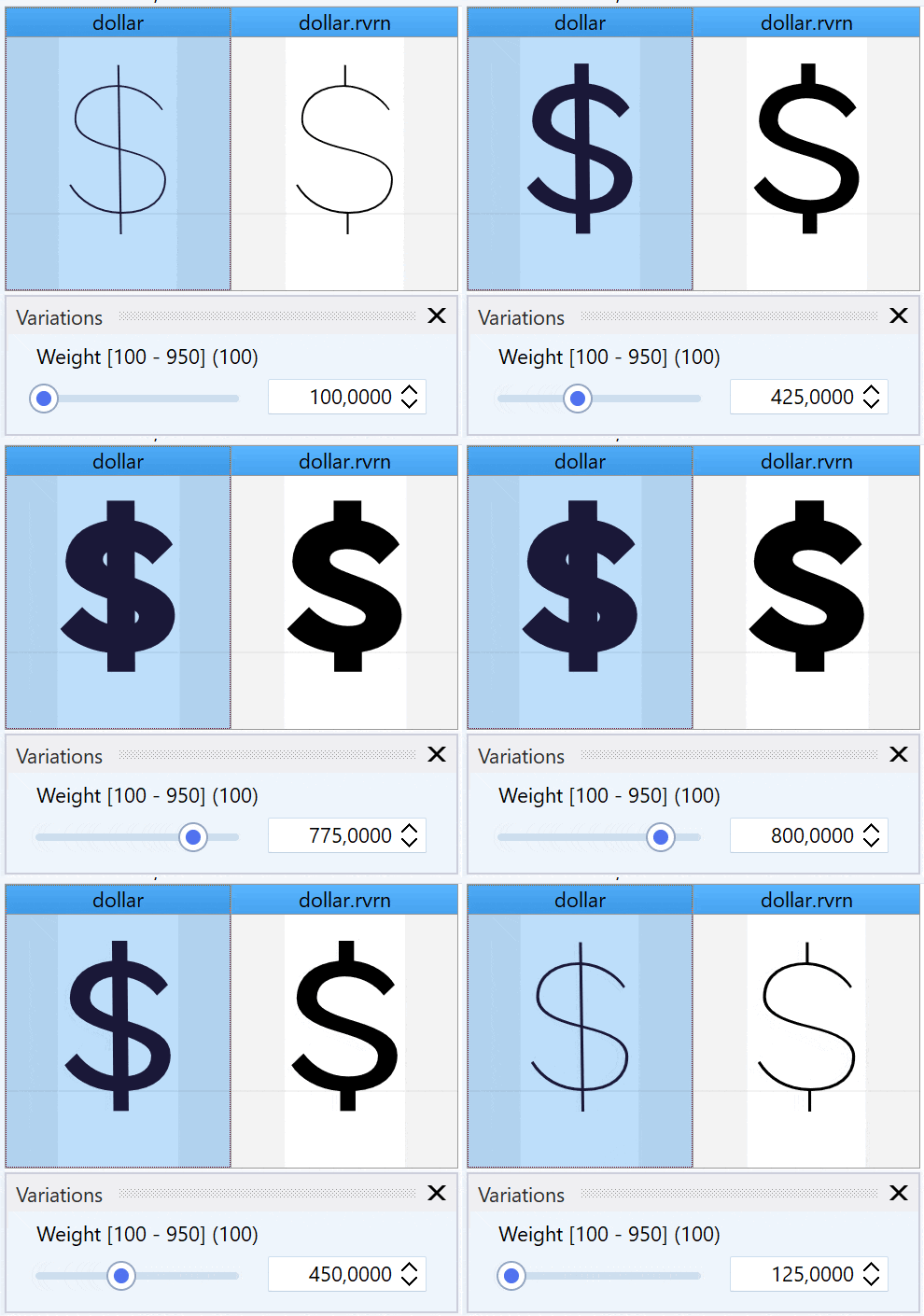
Switch Glyphs with Feature Variations
Swap an alternate glyph design over part of a variable font's design space using feature variations (rvrn).

Create OpenType Color Fonts
Author COLR / CPAL and SVG color fonts with the Palette Manager, native color picker and per-format export.

Fix Variable Font Master Compatibility
Read the O/M/F/N/D/S/W/T/A compatibility indicators and fix interpolation issues so masters interpolate cleanly.

Named Instances & Static Font Export
Define named instances in a variable font and export each one as a standalone static font, with the right weight/width class and naming.
G · Font Formats

Which Font Format Should You Export?
A short chooser — when to ship TTF, OTF, WOFF2, a variable font, or a color font.

What's the Difference Between TrueType and OpenType Fonts?
Terminology, history, and why the .ttf/.otf file extension is only a hint, not proof.

TrueType vs PostScript: TTF, OTF & Curve Formats
Quadratic vs cubic Bézier outlines, and when the outline format matters.
H · Export, Test & Release
Export Fonts Correctly
Every Export Settings control explained — outline format, color, hinting, variable targets and CFF2.

Test and Validate Your Font Before Release
Pre-release QA pass: Font Validation, OpenType proofing, and testing on the desktop and the web.
Open & Export .glyphs Files
Round-trip projects with Glyphs through .glyphs v3 — what survives masks, smart components and path decorations.

Optimizing Webfonts by Reducing Character Sets
Subset a webfont for smaller, faster-loading WOFF2 — without breaking dependent OpenType features.

Font Metrics — Vertical Line Spacing
Set compatible vertical metrics to avoid clipping and line-spacing differences across Windows, macOS and the web.

Font Family Settings for Proper Style Linking
Make font families beyond Regular/Italic/Bold link correctly across applications.

Debug OpenType Features with Font Inspection
A worked case study in tracing and fixing a misbehaving OpenType layout feature.

A Guide to Distributing Your Fonts
Distribute through marketplaces, direct licensing or open source — plus how to prepare a release package.

SVG Outline Round-Trip with Illustrator, Figma & Inkscape
Move glyph outlines as SVG — Save as SVG, edit in your design tool, back via Import Artwork.
I · Specialist Workflows

Single-Line Fonts for Engraving and Cutting
Design open-contour fonts for CNC, engraving and cutting machines with FontCreator's Single/Double Stroke export.

Arabic Font Design
Design Arabic and related scripts — contextual forms, anchors and shaping, with interactive proofing of the result.

CJK & Large Fonts in FontCreator
Produce large and CJK fonts — navigation, validation at scale, vertical metrics and performance.

Glyph Tags & the No Tag Filter
Track production inside the font editor: tag glyphs, colour-code your workflow and use the No Tag filter to find what still needs work.
